docs-cockpit
▍ Project cockpit for AI-coding agents · v0.14 ▍ 给 AI 编程协作的项目驾驶舱 · v0.14

The faster AI writes,
the less you understand your project.
AI 写得越快,
你越搞不清项目到哪了。

Cursor / Claude Code / Codex can spit out 47 markdown files in one afternoon — but your PRD got rewritten three times, your module specs each invented their own format, and most plans were never read again. LLMs aren't unreliable. They just have no schema to follow. docs-cockpit gives every AI-written doc one frontmatter schema, validates on disk-write, and turns your docs folder into a single-file kanban dashboard. Cursor / Claude Code / Codex 一下午能产出 47 个 markdown 文件,但 PRD 改过三版、module spec 各自为政、plan 写完没人回看—— 大模型不是不靠谱,是没人给它定规范。 docs-cockpit 用一份 frontmatter schema 约束所有 AI 写的 md,落盘前自动校验,文档目录一键变成单文件可视化看板。

MIT LicenseMIT 开源 Python 3.10+ Zero runtime deps零依赖运行时 Offline不联网 Claude Code plugin ✓Claude Code 插件 ✓
file:///your-project/docs/index.html

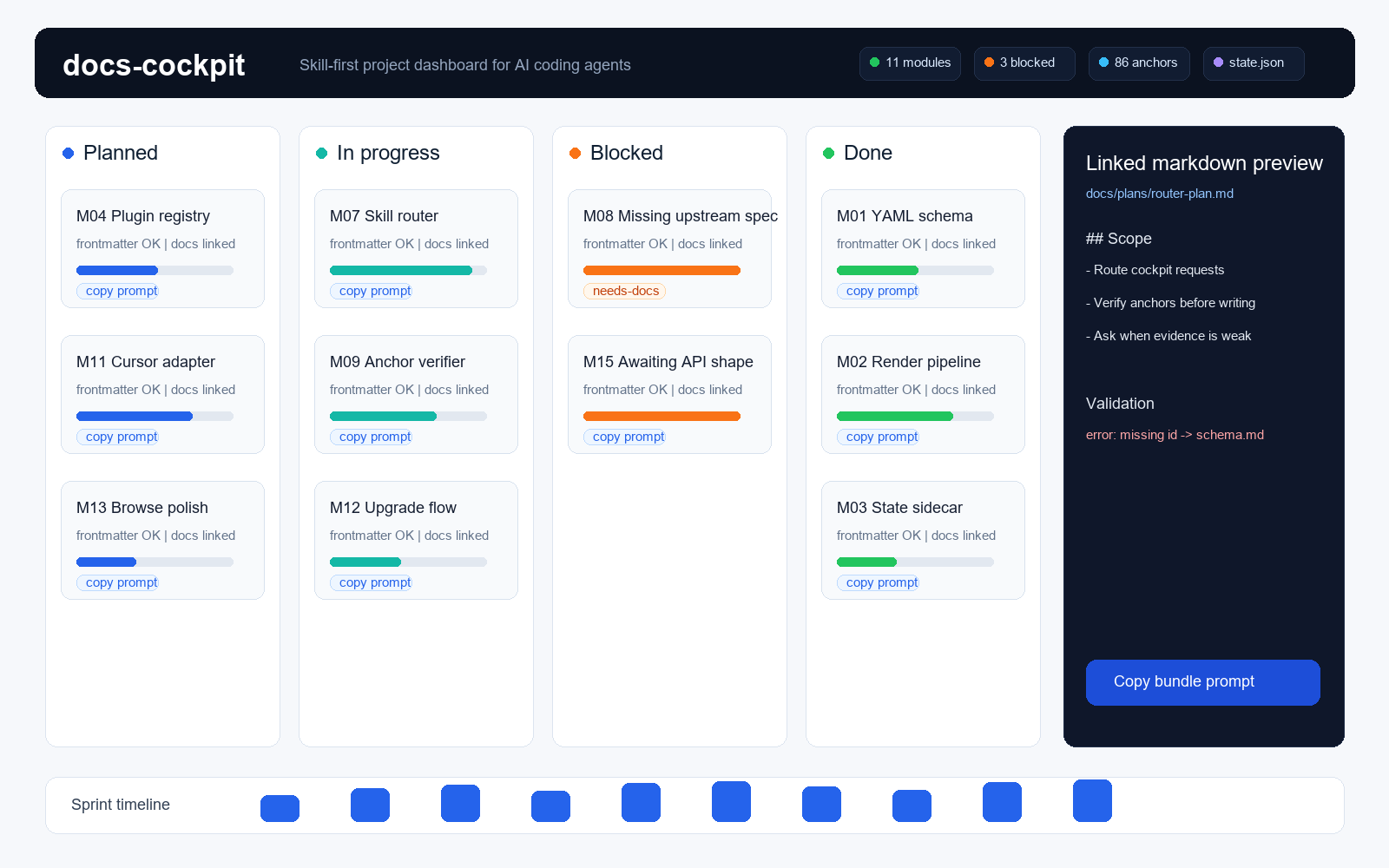
Not started未启动 3

M14
Core Engine
M15
Recipe Hub

Planned已规划 4

M10
Worker Runtime
M11
Scheduler

In progress进行中 5

M07
Job / Task FSM
M09
SDK / CLI

Blocked阻塞 1

M12
Resource Pool

Done已完成 8

M01
Web Console
M02
Browser Plugin

Why you need it 为什么 AI 时代需要它

Your markdown spiral isn't "too much AI". md 文件失控的真正原因,不是 AI 写太多。

It's that LLMs invent a new format every time you ask. No schema = AI is the least reliable teammate you've ever had. You don't need more management tools — you need one spec AI is forced to obey. 是大模型每次写文档的字段、命名、格式都不一样——没有 schema 约束,AI 是最不可靠的"同事"。 你需要的不是更多管理工具,是一份规范让 AI 强制对齐

▍ Before docs-cockpit▍ vibe coding 之前 Ask AI "what fields should this plan have" — it gives you a new format every time.
In one project: plan-01.md uses status: in-progress, plan-02.md uses state: doing, plan-03.md has no status field at all.
每次问 AI "怎么写这个 plan",它都给你一套新格式。
一个项目里 plan-01.md 用 status: 进行中,plan-02.md 用 state: in-progress,plan-03.md 干脆没有状态字段。
▍ After docs-cockpit▍ docs-cockpit 之后 AI reads a docs-cockpit-author skill before writing anything — required fields, naming rules, status enum all defined there. AI doesn't invent rules. It executes them. AI 写任何文档前,先读一份 docs-cockpit-author skill——里面规定了所有必填字段、命名规则、状态枚举。 AI 不再发明规则,它执行规则。
▍ Before docs-cockpit▍ vibe coding 之前 AI writes progress: 60 and status: done. The contradiction is invisible to your eyes.
You only find out on launch day that the "finished" module is 60% done.
AI 把 progress 写成 60、status 写成 done——内部矛盾你肉眼根本看不出来。
上线那天才发现"已完成"的模块进度只有 60%。
▍ After docs-cockpit▍ docs-cockpit 之后 Every build runs validate_meta(). Status × progress invariant fails — immediate error:
❌ M07.md · status:done conflicts with progress:60
每次 build 跑 validate_meta(),状态 × 进度的不变式不通过直接报错:
❌ M07.md · status:done 与 progress:60 矛盾
▍ Before docs-cockpit▍ vibe coding 之前 47 md files in docs/. Nobody can tell at a glance where the project is.
You open them one by one — and still can't summarize.
docs 目录里 47 个 md 文件,没人能一眼看出项目做到哪了。
想看进度只能挨个打开读,读完还是讲不清。
▍ After docs-cockpit▍ docs-cockpit 之后 One command docs-cockpit build. The folder becomes one HTML:
kanban + sprint timeline + progress bars + subtask checklist + inline doc preview — double-click locally to open.
一行命令 docs-cockpit build,整个目录变成一个 HTML:
Kanban 看板 + Sprint 时间线 + 进度条 + 子任务清单 + 关联文档预览——本地双击就开
▍ Before docs-cockpit▍ vibe coding 之前 Jira / Notion / Linear all need copy-paste; data lives on their servers; team use scales as monthly fees.
Want a new field? Wait for their roadmap.
Jira / Notion / Linear 都要复制粘贴一遍内容,数据托管在别人那。
想加新字段?等 SaaS 排期吧。
▍ After docs-cockpit▍ docs-cockpit 之后 Data lives in your git repo as markdown.
Single HTML, zero deps, no network, MIT — full ownership stays with you.
数据就在你 git 仓库的 markdown 里。
单 HTML 文件、零依赖、不联网、MIT 协议——所有权完全归你

Core capabilities 核心能力

Give LLMs a spec they can actually obey. 给大模型一个能落地的项目规范。

v0.14 keeps evolving docs-cockpit beyond a "project visualizer" to an "AI co-pilot cockpit". Every capability maps to a real wall vibe coders hit. v0.14 持续把 docs-cockpit 从"项目状态可视化"演进为"AI 协作驾驶舱"。每个能力都对应一个 vibe coding 实际会撞墙的场景。

Frontmatter schema enforcementFrontmatter Schema 强校验

Missing required fields, status × progress conflicts, unknown keys — all caught at build time. Error messages point to the exact line of the author skill, so AI can read its own error and fix itself.必填字段缺失、status×progress 矛盾、未知字段——全部在 build 阶段拦截。错误信息指向 author skill 第几条,AI 看到错误能自己改。

AI reads a skill before writingAI 写文档前先读 skill

Four skills cover four scenarios: setup / authoring / weekly / status. The skills ARE the conventions — AI no longer asks you "what frontmatter to use".4 个 skill 覆盖 4 个场景:setup / 写文档 / 出周报 / 查状态。skill 是规范的载体——AI 不用每次问你"frontmatter 应该咋写"。

One-click prompt copy per subtaskSubtask 一键复制 prompt

Each subtask renders a ready-to-paste prompt (context + code anchors + linked docs). Click Copy → paste into Claude Code / Cursor / Codex → AI executes.每个子任务渲染好的 prompt(含上下文+代码锚点+关联文档),点 Copy 粘贴到 Claude Code / Cursor / Codex 就能让 AI 直接执行。

Refine with AI · dual modeRefine with AI · 双模式

"Have AI audit my anchor precision" — CLI agents drop a YAML patch directly; browser LLMs output the patch for you to copy. Engineer-in-the-loop, one-click round-trip."让 AI 帮我审一遍代码锚点对不对"——CLI agent 直接落 patch;浏览器 LLM 输出 patch 给你复制。一键交回,工程师在场内。

Multi-project weekly aggregation多项目周报聚合

~/.docs-cockpit/ registers every project, weekly snapshots run automatically, AI composes a cross-project weekly with WoW diff (newly done / blocked / progress jumps / new modules).~/.docs-cockpit/ 注册所有项目,每周快照一次,AI 自动生成跨项目周报+周环比 diff(新完成/新阻塞/进度跃升/新增模块)。

Single HTML · file:// works单文件 HTML · file:// 即开

No server, no SSG, no JS framework, zero network at runtime. Commit the dashboard to git — anyone who clones can double-click and see it.不要服务器、不要 SSG、不要 JS 框架、运行时不发任何网络请求。生成的 dashboard 提交到 git,团队任何人 clone 下来双击就看到。

30-second setup 30 秒上手

Three install paths, pick yours. 三种装法,选你顺手的

Same Python CLI underneath. Claude Code users get it in one command; other AI editors install via uv / pipx / pip. 底层是同一个 Python CLI——Claude Code 用户一行命令搞定;其他 AI 编程工具用户用 pip / uv / pipx 装 CLI 即可。

▍ Claude Code users (recommended) ▍ Claude Code 用户(推荐)

Install the plugin in Claude Code, then say "make a dashboard for my docs folder" — it handles Python bootstrap automatically. 在 Claude Code 里直接装插件,跟它说"帮我把 docs 做成 dashboard",它自己处理 Python 装机。

# In Claude Code在 Claude Code 里 /plugin marketplace add Guohao1020/docs-cockpit /plugin install docs-cockpit@docs-cockpit # Then tell your agent然后跟 AI 说 "make a dashboard for my docs folder帮我把 docs 文件夹做成 dashboard"

▍ Cursor / Codex / other AI editors ▍ Cursor / Codex / 其他 AI 编辑器

Install the Python CLI yourself — uv / pipx / pip, pick one. Then init the config. 手动装 Python CLI——uv / pipx / pip 三选一,然后初始化配置文件。

# Install CLI (pick one)装 CLI(选一种) uv tool install docs-cockpit pipx install docs-cockpit pip install --user docs-cockpit # In your project root在你项目根目录 docs-cockpit init docs-cockpit build

▍ Native packaging for Codex CLI / Codex App / Factory Droid / Gemini CLI / OpenCode / GitHub Copilot CLI is on the roadmap. The schema/validator/spec are all agent-agnostic. ▍ Codex CLI / Codex App / Factory Droid / Gemini CLI / OpenCode / GitHub Copilot CLI 的原生打包在路线图上,schema/validator/spec 都是 agent-agnostic 的。

Who this is for 这个工具是给谁的

Not just for developers. 不只是给写代码的人。

AI has rewritten the demographic of "people who work in markdown" — indie devs, PMs, content creators, knowledge workers all produce markdown at scale through AI. docs-cockpit gives every one of them the same visualization layer. AI 改写了"用 markdown 工作"的人口结构——独立开发者、PM、内容创作者、知识工作者,都在用 AI 大量产出 markdown。docs-cockpit 给所有这些场景一个统一的可视化层。

Indie devs who code with AI用 AI 写代码的独立开发者

You're the core user. Heavy Cursor / Claude Code / Codex use, multiple projects in parallel, allergic to monthly SaaS fees. The 4 skills + 7 slash commands are designed for you.你是核心用户。Cursor / Claude Code / Codex 重度依赖,多项目并行,最讨厌 SaaS 月费。docs-cockpit 的 4 个 skill + 7 个 slash 命令是为你设计的。

▶ 30s Quickstart▶ 30 秒上手

PMs & knowledge workers in the AI eraAI 时代的 PM / 知识工作者

You don't write code, but you use ChatGPT / Claude to draft requirements, write plans, build OKRs. Your markdown piles up. docs-cockpit lets AI turn it all into a board — no Notion team subscription needed.你不写代码,但用 ChatGPT / Claude 整理需求、写策划、做 OKR。markdown 越攒越多,docs-cockpit 让 AI 帮你把它们做成看板,不用买 Notion 团队版。

▶ See PM-scenario FAQ▶ 看 PM 场景 FAQ

Beginners getting into AI coding想入门 AI 编程的小白

Claude Code is the easiest entry to AI coding. With the docs-cockpit plugin, you say one sentence — AI installs Python, runs commands, opens the browser. You only see the result.Claude Code 是最适合入门的 AI 编程工具。装好 docs-cockpit 插件后,你跟 AI 说一句话,它会自己装 Python、自己跑命令、自己开浏览器——你只需要看结果。

▶ One-command install▶ Claude Code 一键装

Tech bloggers · KOLs · early adopters技术博主 / KOL / 早期 adopter

v0.14 is a rare "complete answer" in the vibe-coding engineering direction: skill + validator + dashboard + portfolio + bilingual + 118 unit tests + CI matrix. Architecture diagrams and CHANGELOG are ready material.v0.14 是 vibe coding 工程化方向上少见的"完整答卷":skill + validator + dashboard + portfolio + bilingual + 118 单测 + CI 矩阵。架构图和 CHANGELOG 直接可用作素材。

▶ Read CHANGELOG▶ CHANGELOG 看深度

Common questions 常见问题

What you're probably wondering. 你大概率想问的

Not on the list? File an issue on GitHub. 如果你的问题不在下面,欢迎到 GitHub Issues 留言。

Why does my docs folder get worse the more AI writes? 为什么 AI 写出来的 markdown 越多反而越乱?
Because LLMs invent a new format every time you ask. No schema = AI is your most unreliable teammate. Ask "what fields should a plan have" today, get answer A; ask tomorrow, get answer B. docs-cockpit writes the spec into a skill — AI reads it before authoring every plan / RFC / spec, runs frontmatter validation on disk-write, and errors point to the exact spec line that was violated. 因为大模型每次写文档的字段、命名、格式都不一样——没有 schema 约束,AI 是最不可靠的"同事"。你今天问它"plan 该有哪些字段"它给一套答案,明天再问换一套。docs-cockpit 把规范写进一份 skill,AI 每次写 plan / RFC / spec 都先读规范,落盘前还会跑 frontmatter 验证,错了立刻指向规范第几条。
How is docs-cockpit different from Notion / Jira / Linear? docs-cockpit 和 Notion / Jira / Linear 有什么区别?
Notion / Jira / Linear are SaaS — you copy-paste content there, data lives on their servers, team use means monthly fees. docs-cockpit reads markdown directly from your git repo. Zero deps, no network, single HTML you double-click. AI edits md → re-run one command → dashboard updates. The philosophy: markdown is the source of truth, dashboard is just a view. Notion / Jira / Linear 是 SaaS——你要复制粘贴内容过去,数据在他们手里,多人用还得交月费。docs-cockpit 直接读你 git 仓库里的 markdown,零依赖、不联网、单 HTML 文件双击就开。AI 改 md,重跑一行命令,看板就同步。哲学是"markdown 是 source of truth,dashboard 只是一种视图"
I'm not a developer — can I use this? 我不是程序员,可以用吗?
Yes. If you already use Claude Code or Cursor to draft project notes, organize material, or write product docs, docs-cockpit is for you. Lowest bar: install the Claude Code plugin in one command, then say "make a dashboard for my docs folder" — it installs Python, runs the CLI, and generates the dashboard. You only see the result. 可以。如果你已经在用 Claude Code / Cursor 写项目笔记、整理资料、做产品文档,docs-cockpit 就是给你的。最低门槛:装一次 Claude Code 插件(一行命令),然后跟 AI 说"帮我把 docs 文件夹做成看板",它自己装 Python、自己跑、自己出图。你只需要看结果。
Which AI coding tools are supported? 支持哪些 AI 编程工具?
Native: Claude Code (plugin marketplace, one-command install). Under the hood it's a Python CLI plus markdown skills, so Cursor / Codex CLI / Codex App / Factory Droid / Gemini CLI / OpenCode / GitHub Copilot CLI users can install the CLI manually — every agent shares the same schema. Native packaging for the rest is on the roadmap. 原生支持 Claude Code(插件市场一行命令安装)。底层是 Python CLI + markdown skill,所以 Cursor / Codex CLI / Codex App / Factory Droid / Gemini CLI / OpenCode / GitHub Copilot CLI 用户可以手动装 CLI 后使用——所有 agent 共用同一份 schema 规范。原生打包正在路线图上。
Is data uploaded? Is it free? 数据会上传吗?要付费吗?
Free, MIT license, zero network calls at runtime. The dashboard is a local HTML file — open it locally or commit it to git for team sharing. All data lives on your disk and in your git repository. 完全免费、MIT 协议开源、运行时零网络请求。dashboard 是一个本地 HTML 文件,你可以双击打开,也可以提交到 git 仓库作为团队共享。所有数据都在你自己的硬盘和 git 仓库里。
What happens when AI generates broken frontmatter? 大模型生成的 frontmatter 经常出错怎么办?
This is exactly what docs-cockpit solves. Every build runs validate_meta() and emits three severities:
error — dashboard can't render this doc (e.g. missing id)
warn — renders but state is suspicious (e.g. status:done with progress:60)
hint — polish (e.g. missing desc weakens "Copy prompt" context)
Every issue carries a 💡 fix suggestion and a 📚 see spec reference — AI sees the error and fixes itself.
这是 docs-cockpit 专门解决的问题。每次 build 都会跑 validate_meta(),输出三级问题:
error(看板没法渲染这个文档,比如 id 缺失)
warn(能渲染但状态可疑,比如 status:done 但 progress:60)
hint(可润色,比如缺 desc 会让"复制 prompt"上下文不全)
每条问题都带 💡 fix 修复建议和 📚 see 规范引用——AI 看到错误能自己改。
How do I migrate existing docs/plans/ / docs/RFC/? 已有的 docs/plans/ docs/RFC/ 目录怎么迁移?
Tell your AI "take over this project with docs-cockpit". The docs-cockpit skill triggers the migrate flow — dry-runs first, shows what will move where, confirms, then git mv + frontmatter scaffold injection. All in git history, fully reversible. 跟你的 AI 说"用 docs-cockpit 接管这个项目"。docs-cockpit skill 会触发 migrate 流程:先 dry-run 给你看会动哪些文件,确认后 git mv 重命名 + 注入 frontmatter scaffold,全程在 git 历史里可追溯。
Can it integrate with CI / pre-commit? 能集成到 CI / pre-commit 吗?
Yes. docs-cockpit lint emits structured stdout (error/warn/hint), and --strict exits non-zero on errors — drop it into GitHub Actions or a pre-commit hook. state.json is a stable machine-readable sidecar (0.2.0+ only adds fields, never removes) — external tools read it for invariant checks. This repo itself ships a 9-cell CI matrix (3 Python × 3 OS) + 118 unit tests, directly usable as a reference. 可以。docs-cockpit lint 输出 stdout 三段式(error/warn/hint),且 --strict 模式会因 error 退出非零——直接接到 GitHub Actions / pre-commit hook 都行。state.json 是稳定的机器可读 sidecar(0.2.0+ 只加字段不减字段),外部工具读它做不变式检查。v0.14 仓库本身就有 9-cell CI 矩阵(3 Python × 3 OS)+ 118 单测,可以直接参考。

Time to teach AI to write to spec. 该让 AI 学会按规范写文档了。

MIT license. Python. One-command install for Claude Code. Give your project a cockpit. MIT 协议、Python 实现、Claude Code 一行命令装。给你的项目装一个驾驶舱。

▍ View on GitHub / Star ▍ 在 GitHub 看代码 / Star Read CHANGELOG 读 CHANGELOG